Intel Core Ultra X9 388H

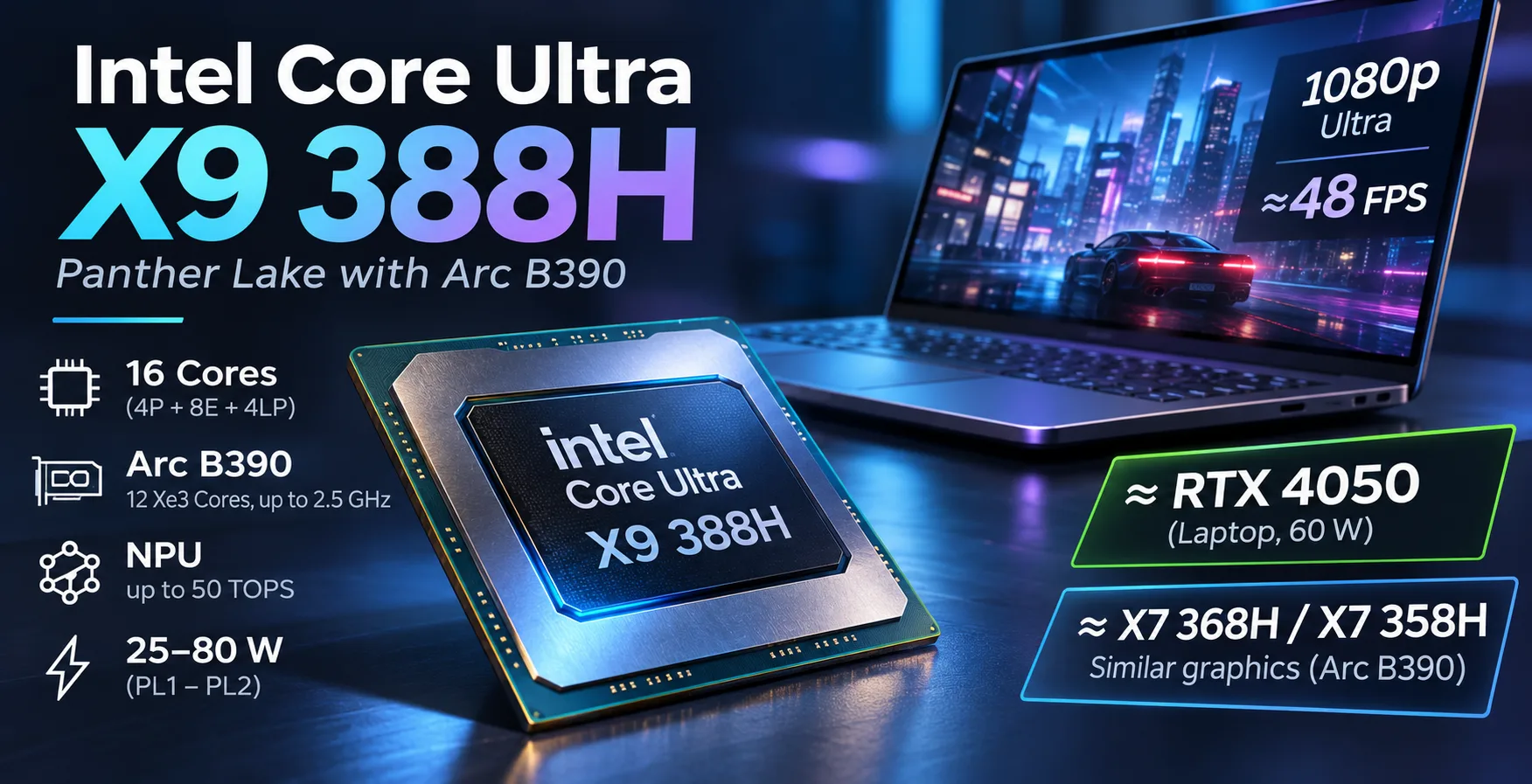
Intel Core Ultra X9 388H: Graphics Close to RTX 4050, but X7 Nearly Keeps Up
The Intel Core Ultra X9 388H features an integrated Arc B390 GPU that approaches the GeForce RTX 4050 Laptop with a 60 W power limit in some games. However, the exact same graphics block is installed in the more affordable Core Ultra X7 368H and X7 358H. All three processors feature 12 Xe3 cores with a maximum frequency of 2.5 GHz. Differences in laptop gaming performance are primarily related to power settings, cooling, and memory speed. Therefore, the key question when choosing the X9 388H is whether its faster CPU cores justify the higher price.
How the X9 388H Differs from Other Panther Lake Processors
The Core Ultra X9 388H belongs to the Panther Lake family, introduced in January 2026. The processor contains 16 cores: 4 performance Cougar Cove cores, 8 efficient Darkmont cores, and another 4 low-power Darkmont cores. Each core handles one thread, and the total L3 cache is 18 MB.
The compute die is manufactured using Intel 18A, while the graphics die is produced using TSMC N3E. Base power is 25 W, and maximum turbo power is 80 W. Actual limits depend on the laptop.
The main differences between closely related Panther Lake models are as follows:
| Specification | X9 388H | X7 368H | X7 358H | Ultra 9 386H |
|---|---|---|---|---|
| Max. P-core frequency | 5.1 GHz | 5.0 GHz | 4.8 GHz | 4.9 GHz |
| Integrated graphics | Arc B390 | Arc B390 | Arc B390 | Intel Graphics |
| Xe3 graphics cores | 12 | 12 | 12 | 4 |
| Max. GPU frequency | 2.5 GHz | 2.5 GHz | 2.5 GHz | 2.5 GHz |
| Max. RAM capacity | 96 GB | 96 GB | 96 GB | 128 GB |
| DDR5 support | No | No | No | Yes |
All four processors have the same number of CPU cores and 18 MB of L3 cache. The X9 388H, X7 368H, and X7 358H also have identical integrated graphics configurations. The main difference between them is the CPU core frequencies.
The X7 368H is especially close: its P-cores run at up to 5.0 GHz, compared with 5.1 GHz for the X9. The 386H stands out with significantly weaker integrated graphics and DDR5 support. It is suitable, among other things, for laptops with discrete graphics cards that do not need a powerful integrated GPU.
CPU Performance: The X9’s Advantage Is Small
In the ASUS Zenbook Duo UX8407AA, the X9 388H operates with a short-term power limit of 64 W and a long-term limit of 46 W. With these settings, it delivers high multi-threaded performance and outperforms some Arrow Lake models with higher power limits.
Geekbench 6.7
| Laptop and processor | Single-Core | Multi-Core |
|---|---|---|
| ASUS Zenbook Duo UX8407AA, X9 388H | 3020 | 17694 |
| ASUS ExpertBook Ultra B9406CAA, X7 358H | 2836 | 16674 |
| Xiaomi RedmiBook Pro 14 2025, Ultra 7 255H | 2923 | 17489 |
| ASUS ProArt P16 H7606WI, Ryzen AI 9 HX 370 | 2857 | 15221 |
| ASUS Zenbook S16 UM5606GA, Ryzen AI 9 465 | 2834 | 14562 |
In these tests, the X9 388H is 6.5% faster than the X7 358H in single-threaded performance and 6.1% faster in multi-threaded performance. The difference is small for most work tasks.
In multi-threaded performance, the X9 is on par with the Core Ultra 7 255H. At the same time, Panther Lake demonstrates higher power efficiency and can deliver comparable performance with lower power consumption.
However, Geekbench results do not directly indicate sustained rendering or compilation performance. Under prolonged loads, cooling and the power limit set by the manufacturer are highly significant.
Arc B390: Panther Lake’s Main Advantage
The integrated Intel Arc B390 uses the Xe3 architecture, contains 12 graphics cores, and operates at up to 2.5 GHz. Unlike a discrete graphics card, it uses system memory shared with the processor.
Compared with Arc Graphics 140T and 140V, performance has increased by approximately 60-80%, depending on the test. In some configurations, the Arc B390 approaches the GeForce RTX 4050 Laptop, although more powerful RTX 4050 versions retain an advantage.
3DMark Time Spy Graphics
| Laptop and graphics card | Score |
|---|---|
| Lenovo IdeaPad Pro 5 16IMH G9, RTX 4050 90 W | 8574 |
| Lenovo Yoga Pro 7 14IMH9, RTX 4050 60 W | 7342 |
| ASUS Zenbook Duo UX8407AA, Arc B390 (X9 388H) | 7190 |
| ASUS ExpertBook Ultra B9406CAA, Arc B390 (X7 358H) | 6679 |
| Microsoft Surface Laptop 7 15, Arc 140V | 4415 |
| MSI Prestige 16 AI Evo B2HMG, Arc 140T | 4194 |
| ASUS Zenbook S16 UM5606, Radeon 890M | 3421 |
In the Zenbook Duo, the Arc B390 trails the RTX 4050 with a 60 W TGP by only about 2%. However, the RTX 4050 version with a 90 W limit is already 19% faster.
The difference between the two laptops with Arc B390 is approximately 8%, even though their graphics blocks have identical specifications. This reflects a comparison between different devices rather than an advantage of the X9’s graphics over the X7’s.
With the same memory speed, the gap becomes smaller. ComputerBase compared the X9 388H in the ASUS Zenbook Duo with the X7 358H in the Samsung Galaxy Book 6 Pro. Both laptops used LPDDR5X-9600. In gaming tests, the X9 was only 3% faster on average.
The earlier result from the X7 358H in the MSI Prestige 14 with LPDDR5X-8533 memory was approximately 12% lower than the X9’s result. This shows how strongly memory speed and power settings affect the Arc B390.
Thus, the integrated graphics of the X9 388H have no architectural advantage over those of the X7 368H or X7 358H. Under comparable conditions, their gaming performance should be similar.
1080p Gaming: Almost Twice the Performance of Arc 140T
The Arc B390 makes it possible to run demanding games without a discrete graphics card. In Cyberpunk 2077 and Baldur's Gate 3, it delivers approximately 45-48 FPS at maximum settings and a resolution of 1920 x 1080.
| Laptop and graphics card | Cyberpunk 2077, Ultra | Baldur's Gate 3, Ultra |
|---|---|---|
| Lenovo Yoga Pro 7 14IMH9, RTX 4050 60 W | 50.8 FPS | 49.8 FPS |
| ASUS Zenbook Duo UX8407AA, Arc B390 | 47.7 FPS | 44.6 FPS |
| ASUS Zenbook Duo UX8406CA, Arc 140T | 24.1 FPS | 24.4 FPS |
In both games, the Arc B390 is almost twice as fast as the Arc 140T in the previous Zenbook Duo. Its deficit compared with the RTX 4050 with a 60 W TGP is approximately 6-10%.
This improvement is due to the move to the Xe3 architecture, not to any advantage of the X9 over the X7. Laptops with the X7 368H and X7 358H can deliver similar gaming performance with comparable power and memory settings.
However, a stable 60 FPS at maximum settings is not always possible. Smoother gameplay will require reducing graphics quality or enabling image upscaling.
The Arc B390 also supports XeSS 3 with frame generation. In Cyberpunk 2077, MFG x2 increased the displayed frame rate from 47.7 to 83.5 FPS. However, the additional frames are generated by an algorithm, so input responsiveness does not improve proportionally to the FPS figure.
At 2560 x 1600 and higher resolutions, graphics requirements increase significantly. The Arc B390 is suitable for gaming without a discrete graphics card, but it does not replace a powerful gaming GPU in all scenarios.
What Happens When Power Is Reduced
Arc B390 performance depends heavily on the power limit. This is especially important for thin laptops, where the cooling system may not allow the processor to operate at maximum frequencies for extended periods.
Notebookcheck tested the X9 388H with processor package power limits ranging from 20 to 45 W.
| Power limit | Time Spy Graphics | Cyberpunk 2077 Ultra, 1080p |
|---|---|---|
| 20 W | 4567 | 27.2 FPS |
| 28 W | 5600 | 33.2 FPS |
| 35 W | 6321 | 36.5 FPS |
| 45 W | 6830 | 41.2 FPS |
When the limit is reduced from 45 to 20 W, the Time Spy score falls by one-third. In Cyberpunk 2077, the frame rate drops from 41.2 to 27.2 FPS.
For comparison, at a 35 W limit, the Arc B390 in a laptop with the X7 358H scored 6296 points, compared with 6321 for the X9 388H. The difference is less than 1%. The Cyberpunk 2077 results are also close: 37 FPS for the X7 versus 36.5 FPS for the X9.
Even with the same power limit, results can differ between laptops. However, these measurements confirm that the same Arc B390 configuration delivers similar results under comparable operating conditions.
NPU and Other Capabilities
The X9 388H is equipped with an Intel AI Boost NPU delivering up to 50 TOPS in INT8. This is sufficient for Copilot+ PC requirements and local AI tasks that support the corresponding accelerator.
For running large language models, the amount of available memory, software support, and GPU capabilities are more important. High NPU performance alone does not guarantee fast LLM operation.
The processor also supports hardware AV1 encoding and decoding, VVC decoding, Thunderbolt 4, and PCIe 5.0.
Laptops with the X9 388H and Pricing
One of the first laptops with the Core Ultra X9 388H is the ASUS Zenbook Duo UX8407AA. It features two 14-inch OLED displays with a resolution of 2880 x 1800, 32 GB of LPDDR5X memory, and a 99 W battery.
ASUS announced the following recommended US prices:
- $2499.99 - Zenbook Duo with the Core Ultra 9 386H and Intel Graphics.
- $2699.99 - Zenbook Duo with the Core Ultra X9 388H and Arc B390.
These were the prices at launch, not a guaranteed retail price.
The $200 difference is primarily related to the graphics. The GPU performance gap between the 386H and X9 388H is large, so the premium is justified for gaming and GPU-accelerated tasks. For office applications, web browsing, and ordinary software development, it is unlikely to provide a noticeable benefit.
However, the situation is different when comparing the X9 388H with the X7 models. All three processors feature the same Arc B390, while their CPU frequencies differ only slightly. Therefore, when choosing between laptops with the X9 and X7, price, cooling, memory speed, and memory capacity matter more than the processor’s name.
Is a Laptop with the Core Ultra X9 388H Worth Buying?
The Core Ultra X9 388H combines high CPU performance with one of the fastest integrated GPUs of its generation. In the games tested, the Arc B390 is almost twice as fast as the Arc 140T and approaches the mobile RTX 4050 with a 60 W TGP.
However, this is an advantage of the Panther Lake graphics architecture, not a feature unique to the higher-end X9 model. The X7 368H and X7 358H have the same Arc B390 with 12 Xe3 cores and a frequency of up to 2.5 GHz.
In Geekbench 6, the tested X9 388H outperformed the X7 358H by approximately 6%, but under comparable conditions the difference in games is much smaller. ComputerBase’s comparison showed an average X9 advantage of only 3% when both laptops used LPDDR5X-9600.
The Core Ultra X7 368H is even closer to the higher-end model in terms of CPU specifications: the maximum P-core frequency differs by just 100 MHz. A significant gaming advantage for the X9 should not be expected.
Conclusion: The Core Ultra X9 388H is justified if it is installed in a reasonably priced laptop with good cooling and fast memory. However, it is not worth specifically paying extra for it when a less expensive configuration with the X7 368H or X7 358H is available. Virtually all of the Arc B390’s advantages are also available in the lower-end models.
CPU Comparison
Compare Core Ultra X9 388H with other CPUs
Basic
CPU Specifications
Memory Specifications
GPU Specifications
Interfaces and Ports
Benchmarks
Compared to Other CPU
Related CPU Comparisons





Share in social media
Or Link To Us
<a href="https://cputronic.com/cpu/intel-core-ultra-x9-388h" target="_blank">Intel Core Ultra X9 388H</a>