NVIDIA GeForce RTX 4050

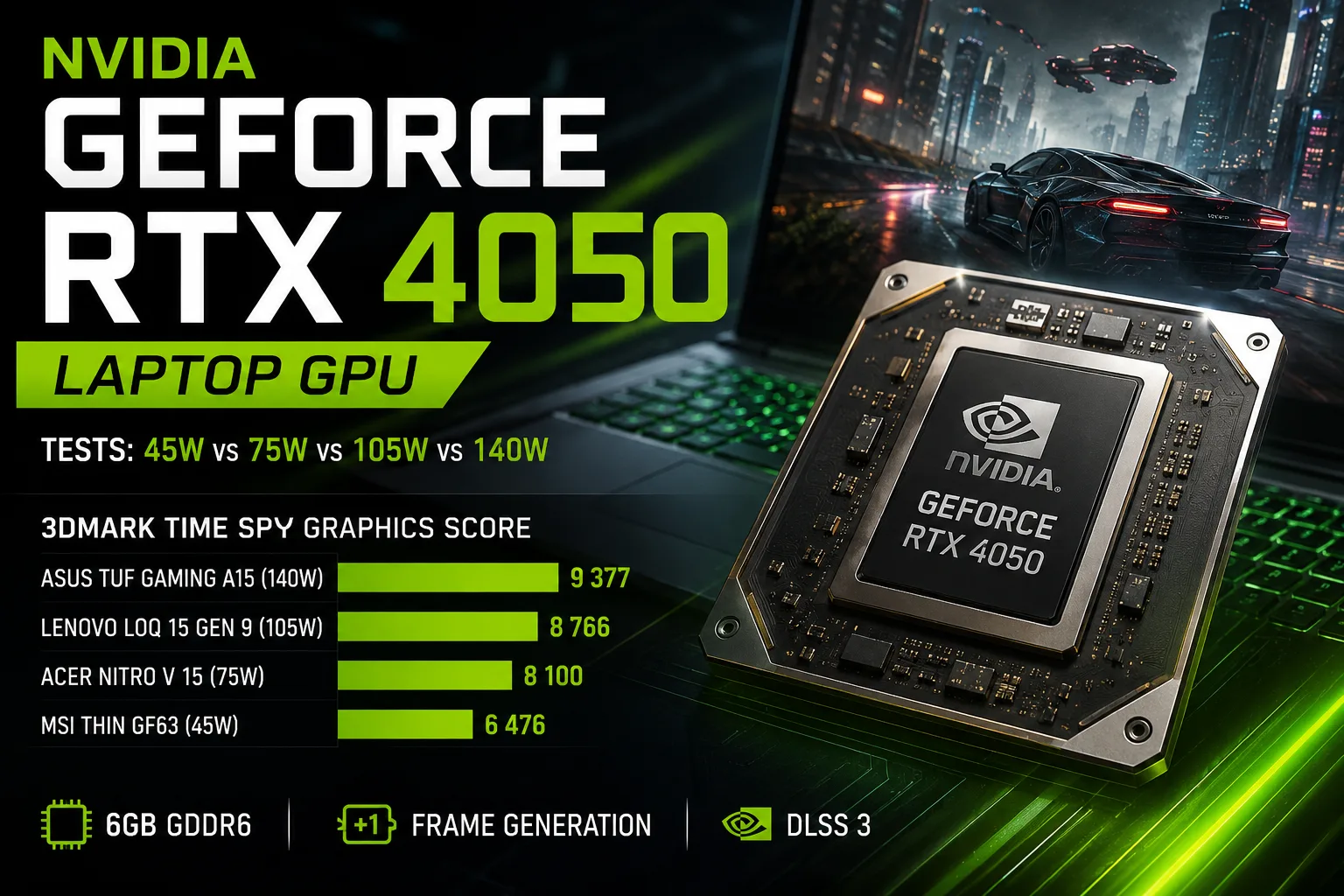
NVIDIA GeForce RTX 4050 Laptop GPU: Tests of Versions at 45, 75, 105, and 140 Watts
The NVIDIA GeForce RTX 4050 was released only in a mobile version. The company did not present a separate RTX 4050 for desktop computers; the lower desktop model of the Ada Lovelace generation is the RTX 4060. Therefore, laptops, all-in-ones, and compact systems with the RTX 4050 use the GeForce RTX 4050 Laptop GPU.
The name of the graphics card alone is not enough to assess the speed of a specific laptop. In the thin MSI Thin GF63, the power of the RTX 4050 is limited to 45 W, while ASUS claims up to 140 W for the TUF Gaming A15 with Dynamic Boost. In 3DMark, the difference between these configurations reaches almost 45%.
Mobile Ada Lovelace with 6 GB of Memory
The RTX 4050 Laptop GPU features 2560 CUDA cores, 6 GB of GDDR6 memory, and a 96-bit bus. The Boost frequency ranges from 1605 to 2370 MHz, and the official power range for the graphics subsystem is 35-115 W. Specific frequencies and limits are determined by the laptop manufacturer.
The Ada Lovelace architecture brought third-generation RT cores, fourth-generation Tensor cores, and hardware frame generation. In terms of technology, the RTX 4050 significantly outperforms the mobile RTX 3050, but the amount of video memory remains modest.
For gaming in Full HD, 6 GB is still sufficient, but heavy textures, ray tracing, and a resolution of 2560 × 1440 quickly increase memory consumption. In new games, texture quality often has to be reduced sooner than the GPU fully reaches its computational power.
Why RTX 4050 is Available at 45 and 140 Watts
Laptop manufacturers independently configure power limits, Dynamic Boost, cooling, and operating frequencies for the graphics card.
The MSI Thin GF63 uses the RTX 4050 with a maximum power of 45 W. The Acer Nitro V 15 is rated at 75 W, the Lenovo LOQ 15 Gen 9 features a 105 W configuration, while the ASUS TUF Gaming A15 claims up to 140 W with Dynamic Boost.
The value of 140 W does not mean that the graphics processor constantly consumes that power. At ASUS, this figure includes the base limit and an additional Dynamic Boost budget, which can be redistributed between the CPU and GPU.
After a certain level, the RTX 4050 starts to hit the available frequencies and voltage. Therefore, performance growth slows down long before the stated power differences reach their maximum.
3DMark Results in Specific Laptops
For comparison, the 3DMark Time Spy Graphics Score was used. It reflects the performance of the graphics component under DirectX 12 load and is less dependent on the CPU than the overall Time Spy score.
| Laptop | RTX 4050 Configuration in Test | 3DMark Time Spy Graphics |
|---|---|---|
| ASUS TUF Gaming A15 FA507 | Up to 140 W with Dynamic Boost | 9,377 |
| Lenovo LOQ 15 Gen 9 | 105 W | 8,766 |
| Acer Nitro V 15 ANV15-51 | 75 W | 8,100 |
| MSI Thin GF63 12Vx | 45 W | 6,476 |
All results are published by LaptopMedia and relate to the 3DMark Time Spy graphics score. The laptops were tested at different times and varied in drivers, cooling, and factory profiles. Therefore, the table shows a typical range rather than a strict laboratory comparison.
The ASUS TUF Gaming A15 scored approximately 45% more points than the MSI Thin GF63. The most noticeable improvement occurs when going from 45 to 75 W: the score increased by around 25%.
Further increases diminish. The Lenovo, with a 105 W configuration, surpassed the 75 W Acer by about 8%, while the ASUS with the claimed 140 W outperformed Lenovo by about 7%.
In this sample, the 75 W configuration lagged behind ASUS by 14%, while the 105 W configuration was about 7% behind. This does not make the additional watts useless, but it shows that a strict limit of 45 W affects the RTX 4050 more significantly than the difference between more powerful versions.
Gaming: Full HD Remains the Main Resolution
The RTX 4050 is best suited for a resolution of 1920 × 1080. In competitive games, its power is sufficient for screens with high refresh rates. In demanding single-player projects, one often has to choose between maximum textures, ray tracing, and stable frame rates.
DLSS Super Resolution reduces the internal rendering resolution, while Frame Generation adds an intermediate frame. This can noticeably increase the displayed FPS, but frame generation does not fix originally low performance. At a base of 25-30 FPS, control lag and motion instability persist.
The RTX 4050 supports DLSS Super Resolution, Ray Reconstruction, and the generation of one additional frame. Multi Frame Generation and Dynamic Multi Frame Generation are intended for RTX 50 graphics cards.
Ray tracing for this model remains an additional feature rather than a mode for maximum settings. In demanding games, one usually has to enable DLSS and reduce individual graphics settings.
Video Editing, Blender, and CUDA Work
Support for CUDA and OptiX makes the RTX 4050 useful in Blender, DaVinci Resolve, Adobe applications, and other GPU-accelerated software. The 8th generation NVENC encoder supports AV1, which is useful for video recording, streaming, and exporting clips.
For Full HD editing, educational projects, and relatively simple 3D scenes, the performance is sufficient. In serious work tasks, the limitation again becomes the 6 GB of memory: large scenes, high-resolution materials, and some neural network models may not fit in VRAM.
What to Check Before Buying
When choosing a laptop with the RTX 4050, it is important to consider:
- the maximum power of the graphics card;
- the presence of a MUX Switch or Advanced Optimus;
- temperatures and noise under prolonged load;
- gaming tests of the specific model;
- the quality of the installed display.
Particularly careful attention should be paid to thin models with a limit of 45-50 W. On the display, they have the same RTX 4050 listed, but under continuous graphical load, they may fall significantly behind larger laptops.
Conclusion
The GeForce RTX 4050 Laptop GPU is primarily designed for Full HD gaming, CUDA work, and hardware video encoding. The Ada Lovelace architecture, Frame Generation, and AV1 maintain its practical value, but 6 GB of memory limit maximum settings and headroom for future games.
The main feature of the RTX 4050 is the dependence of performance on the specific laptop. In the examined sample, the 140 W model scored approximately 45% more points than the 45 W version. However, after 75-105 W, the returns from additional power diminished significantly.
Therefore, it is important to choose not an abstract RTX 4050, but a laptop with a known power limit, proper cooling, and proven test results. The desktop GeForce RTX 4050 did not exist; it is exclusively a mobile graphics processor.
GPU Comparison
Compare GeForce RTX 4050 with other GPUs
Basic
Memory Specifications
Theoretical Performance
Miscellaneous
Benchmarks
Compared to Other GPU
Related GPU Comparisons


Share in social media
Or Link To Us
<a href="https://cputronic.com/gpu/nvidia-geforce-rtx-4050" target="_blank">NVIDIA GeForce RTX 4050</a>