NVIDIA GeForce RTX 5080 Mobile
RTX 5080 Laptop: Why Identical GPUs Differ in Performance by 38%
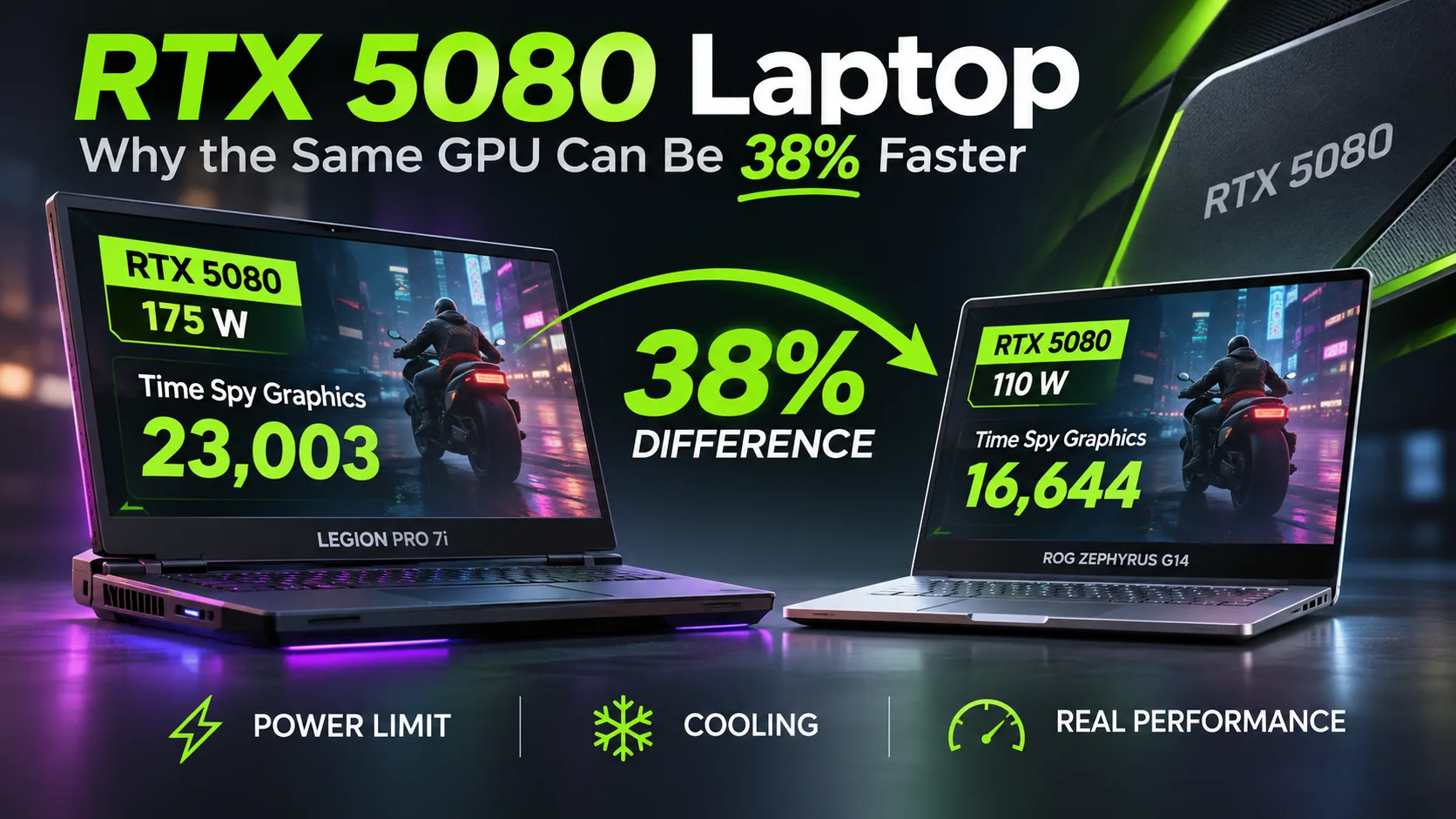
The NVIDIA GeForce RTX 5080 Laptop in the Lenovo Legion Pro 7i scores 23 003 points in 3DMark Time Spy Graphics, while the compact ASUS ROG Zephyrus G14 manages only 16 644. That is a 38% difference, even though both laptops are equipped with an RTX 5080 and 16 GB of GDDR7.
The main reason is power: Lenovo allocates up to 175 W to the GPU, while ASUS allows up to 110 W. Moreover, an RTX 5080 with limited power consumption can lose to an RTX 5070 Ti in a larger gaming laptop. The difference between configurations is so substantial that the GPU name alone says little about real-world performance.
Specifications and Position in the Lineup
The RTX 5080 Laptop was released in spring 2025 based on the Blackwell architecture. It uses a GB203 graphics processor manufactured by TSMC, has 7680 CUDA cores, and comes with 16 GB of GDDR7 offering 896 GB/s of bandwidth.
| Specification | RTX 5070 Ti Laptop | RTX 5080 Laptop | RTX 5090 Laptop |
|---|---|---|---|
| CUDA cores | 5888 | 7680 | 10496 |
| Video memory | 12 GB GDDR7 | 16 GB GDDR7 | 24 GB GDDR7 |
| Memory bus | 192-bit | 256-bit | 256-bit |
| GPU power | 60-115 W | 80-150 W | 95-150 W |
| Maximum with Dynamic Boost | 140 W | 175 W | 175 W |
The additional 4 GB of video memory over the RTX 5070 Ti is useful for demanding 3D scenes and local neural networks that do not fit within 12 GB. For ordinary gaming, the advantage depends primarily on resolution, graphics settings, and GPU power.
Benchmarks: RTX 5080 vs. RTX 5070 Ti and RTX 5090
Specific laptops with different power limits were selected for comparison. The table lists the 3DMark Time Spy Graphics score and Cyberpunk 2077 performance at 2560 x 1440, Ultra, without upscaling or frame generation.
| Laptop and GPU | GPU power | Time Spy Graphics | Cyberpunk 2077, FPS |
|---|---|---|---|
| ASUS ROG Strix SCAR 16, RTX 5090 | 175 W | 23 600 | 107,7 |
| Lenovo Legion Pro 7i, RTX 5080 | 175 W | 23 003 | 99,8 |
| ASUS ROG Strix G16, RTX 5080 | 175 W | 21 571 | 99,5 |
| Lenovo Legion Pro 5i, RTX 5070 Ti | 140 W | 17 966 | 84,3 |
| ASUS ROG Zephyrus G14, RTX 5080 | 110 W | 16 644 | 79,6 |
| ASUS ROG Zephyrus G14, RTX 5070 Ti | 110 W | 14 945 | 71,7 |
The Lenovo Legion Pro 7i with an RTX 5080 is 28% faster than the Legion Pro 5i with an RTX 5070 Ti in Time Spy Graphics and 18% faster in Cyberpunk 2077. The results are affected not only by the GPU, but also by differences in the processors, cooling, and power settings.
At the same time, the RTX 5070 Ti running at 140 W in the Legion Pro 5i is faster than the RTX 5080 running at 110 W in the Zephyrus G14: 84,3 versus 79,6 FPS. The lower-tier GPU outperforms the higher-tier model thanks to its higher power limit.
The RTX 5090 Laptop in the Strix SCAR 16 is approximately 8% faster than the 175-watt RTX 5080 in the Legion Pro 7i in Cyberpunk 2077. The higher-tier model also offers 24 GB of video memory instead of 16 GB.
The Impact of Power on Performance and Noise
The ASUS ROG Strix G16 makes it possible to compare different power modes on the same laptop, without differences in the processor or cooling system.
| Mode | GPU power | Time Spy Graphics | Cyberpunk 2077, 1440p |
|---|---|---|---|
| Silent | 55 W | 11 041 | 43,1 FPS |
| Performance | 160 W | 20 138 | 91,6 FPS |
| Turbo | 175 W | 21 571 | 99,5 FPS |
Increasing power from 160 to 175 W adds 9% FPS, but noise rises from 49,3 to 54,2 dB(A). Performance mode reduces noise by almost 5 dB(A) with a comparatively small performance loss.
The compact Zephyrus G14 limits the RTX 5080 to 110 W. That is the trade-off for its small chassis and weight of about 1.6 kg. The laptop is easier to carry, but its gaming performance is noticeably lower than that of larger models with the same GPU.
When choosing an RTX 5080 Laptop, check the following:
- GPU power. Configurations rated at 150-175 W deliver the highest performance.
- Cooling and noise. Even at the same power level, clock speeds and noise levels can differ.
- Results from the specific laptop. The processor, system memory, and power mode also affect FPS.
1440p Gaming and Ray Tracing
The following results were recorded on the ASUS ROG Strix G16 with a 175 W RTX 5080 at a resolution of 2560 x 1440:
| Game | Settings | FPS |
|---|---|---|
| Cyberpunk 2077 | Ultra | 99,5 |
| Baldur's Gate 3 | Ultra | 133,1 |
| Alan Wake 2 | High | 76,5 |
| F1 24 | Ultra High | 84,5 |
| Assassin's Creed Shadows | Ultra High | 50 |
The RTX 5080 delivers more than 75 FPS in four of the five games listed, without DLSS or frame generation. Assassin's Creed Shadows is more demanding: performance drops to 50 FPS at the highest settings.
Path tracing increases the load even further. In Cyberpunk 2077: Phantom Liberty at 2560 x 1600 with RT Overdrive, the Strix G16 produces 21,9 FPS. DLSS Quality raises the result to 43,1 FPS, while Multi Frame Generation x4 increases it to 141,2 FPS.
However, generated frames improve image smoothness but do not reduce input latency proportionally to the increase in FPS. Therefore, 141 FPS with MFG cannot be equated to the same frame rate without frame generation.
RTX 5080 vs. RTX 5070 Ti: Is the Premium Worth Paying?
Two versions of the 2025 ASUS ROG Zephyrus G14 provide a more precise comparison. Both use the Ryzen AI 9 HX 370 and GPUs with a 110 W power limit. The tested units differed in system memory capacity: 64 GB for the RTX 5080 model and 32 GB for the RTX 5070 Ti model.
| Test | RTX 5070 Ti | RTX 5080 | Gain |
|---|---|---|---|
| Time Spy Graphics | 14 945 | 16 644 | 11% |
| Cyberpunk 2077, 1440p | 71,7 FPS | 79,6 FPS | 11% |
| Baldur's Gate 3, 1440p | 97,6 FPS | 106,9 FPS | 10% |
With the same power limit, the difference between the GPUs is approximately 10-11%. The RTX 5080's additional CUDA cores do not produce a proportional performance increase because of the power limitation.
At the US launch of the lineup, ASUS priced the Zephyrus G14 with an RTX 5070 Ti at $2500, while the RTX 5080 version cost $3200. Both US configurations had 32 GB of system memory and a 2 TB SSD. The difference was $700, or 28%, for a much smaller gain in gaming performance. These are the 2025 launch prices, not current store offers.
For gaming, the premium is not worthwhile. However, when working with Blender, demanding 3D scenes, and local neural networks, the RTX 5080's 16 GB of video memory may justify the additional cost if the workloads do not fit within 12 GB.
Is the RTX 5080 Laptop Worth Buying?
The RTX 5080 Laptop is primarily worth buying in powerful gaming laptops with a 150-175 W power limit. In this configuration, it delivers around 100 FPS in Cyberpunk 2077 at 1440p Ultra and clearly outperforms the RTX 5070 Ti in the configurations examined.
In compact 110 W models, the RTX 5080's advantage falls to approximately 10% in the tests shown. Paying several hundred dollars more solely for that kind of FPS increase does not make sense. The RTX 5070 Ti is the better-value choice if its 12 GB of video memory is sufficient.
The RTX 5090 Laptop is worth considering for workloads that require 24 GB of memory. In ordinary 1440p gaming, its advantage over a high-power RTX 5080 may be small.
When choosing an RTX 5080 laptop, it is more important to check its actual performance, cooling, and price than to focus solely on the GPU model. The 175 W version is significantly faster than the compact 110 W configuration, but it also requires a larger cooling system.
GPU Comparison
Compare GeForce RTX 5080 Mobile with other GPUs
Basic
Memory Specifications
Display and Media
Theoretical Performance
Miscellaneous
Benchmarks
Compared to Other GPU
Related GPU Comparisons

Share in social media
Or Link To Us
<a href="https://cputronic.com/index.php/gpu/nvidia-geforce-rtx-5080-mobile" target="_blank">NVIDIA GeForce RTX 5080 Mobile</a>