AMD Radeon Graphics
AMD Radeon Graphics: What Kind of Graphics Card Is It in Ryzen Processors and Why the Name Says Almost Nothing
AMD Radeon Graphics is one of the most vague lines in the specifications of laptops and Ryzen processors. At first glance, it seems to be the name of a specific integrated graphics card. In reality, this label can cover different AMD graphics blocks - from the old Vega in mobile Ryzen to the basic integrated graphics in desktop Ryzen 7000/9000.
In one processor, AMD Radeon Graphics might mean Vega 7, in another - Vega 8, and in a third - minimal graphics just for outputting an image. Therefore, the actual level depends not on the name itself, but on the specific Ryzen model, the number of graphics cores, frequency, and memory.
AMD Radeon Graphics Is Not One Graphics Card
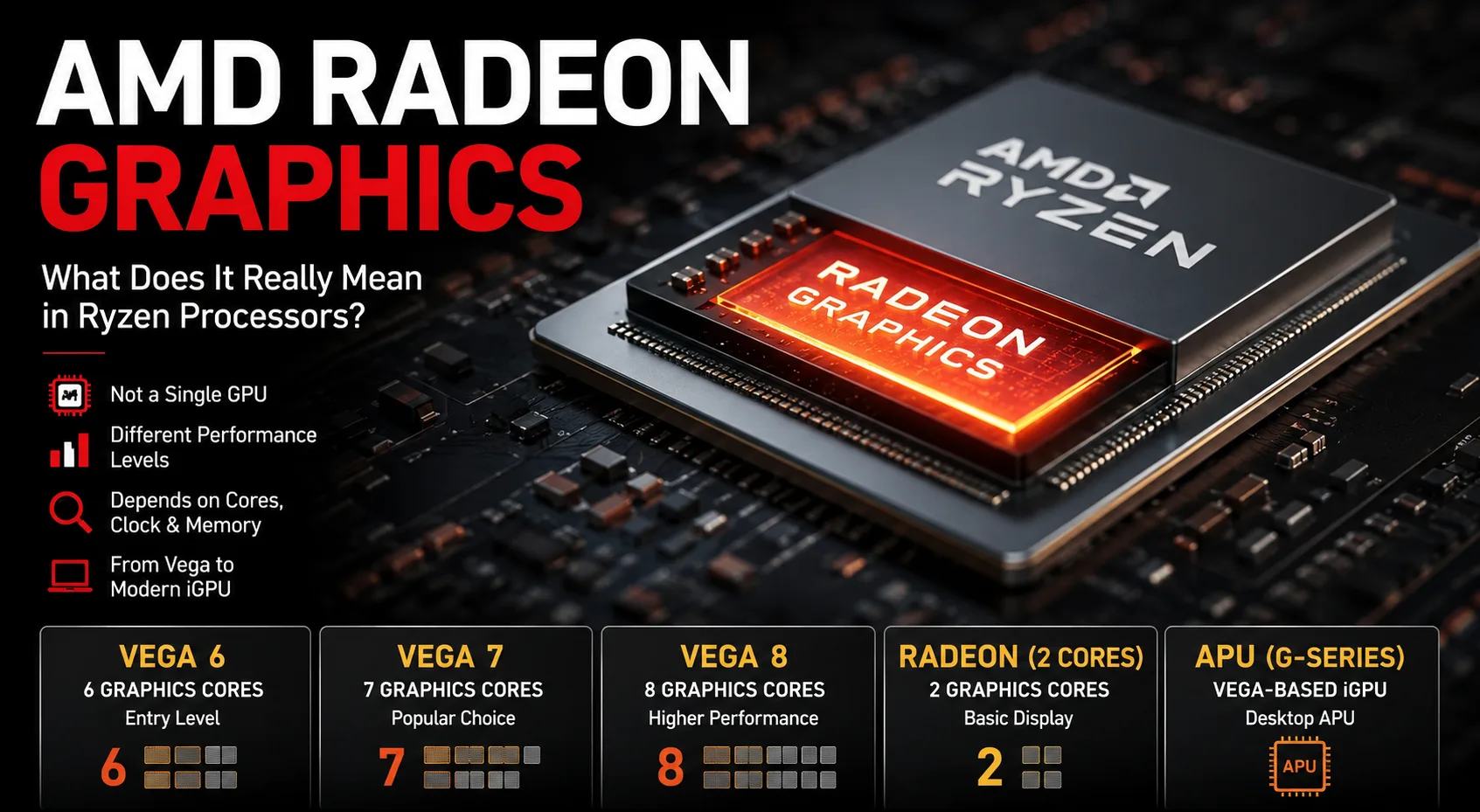
AMD Radeon Graphics is a common shorthand for AMD's integrated graphics, not a precise GPU model. Specifications often do not write Vega 7 or Vega 8, but limit themselves to the neutral label AMD Radeon Graphics or Radeon Graphics. This is inconvenient for consumers: from such a line, it is impossible to understand how powerful the graphics inside actually are.
This label can hide various options:
| What is Written in the Specifications | What It Might Mean |
|---|---|
| AMD Radeon Graphics, 6 graphics cores | most often Vega 6 |
| AMD Radeon Graphics, 7 graphics cores | most often Vega 7 |
| AMD Radeon Graphics, 8 graphics cores | most often Vega 8 |
| Radeon Graphics in Ryzen G-Series | integrated Vega graphics in desktop Ryzen APU |
| AMD Radeon Graphics, 2 graphics cores | basic iGPU in regular desktop Ryzen 7000/9000 |
When Vega Is Hidden Under AMD Radeon Graphics
In older generation mobile Ryzen and in some updated models, the label AMD Radeon Graphics often conceals Vega graphics. This applies to many Ryzen 4000, Ryzen 5000, and some Ryzen 7000 processors, especially the 7030 series.
For example, the Ryzen 5 7530U looks like a newer Ryzen 7000 processor, but its integrated graphics still relate to the old Vega logic. AMD writes AMD Radeon Graphics, indicates 7 graphics cores, and a frequency of up to 2000 MHz. In reviews, this iGPU is usually referred to as Vega 7.
| Processor | Graphics Model | Graphics Core Count | Frequency | How to Understand |
|---|---|---|---|---|
| Ryzen 5 4500U | AMD Radeon Graphics | 6 | up to 1500 MHz | Vega 6 |
| Ryzen 5 5500U | AMD Radeon Graphics | 7 | up to 1800 MHz | Vega 7 |
| Ryzen 5 7530U | AMD Radeon Graphics | 7 | up to 2000 MHz | Vega 7, higher frequency |
| Ryzen 7 5700U | AMD Radeon Graphics | 8 | up to 1900 MHz | Vega 8 |
| Ryzen 7 7730U | AMD Radeon Graphics | 8 | up to 2000 MHz | Vega 8 |
Here it is clear why one name is not enough. AMD Radeon Graphics in the Ryzen 5 5500U and Ryzen 7 7730U is not the same graphics. The former has 7 graphics blocks, and the latter has 8. Frequencies also differ.
For old Vega, it is convenient to count like this: one graphics block, or CU, usually corresponds to 64 shaders. Therefore, Vega 7 means 7 × 64 = 448 shaders, while Vega 8 means 8 × 64 = 512 shaders. But even this does not make all variations identical: memory, TDP, and cooling can significantly change real-world performance.
Approximate Performance Level of Vega
Benchmarks for integrated graphics should be taken with caution. The same graphics block can operate differently depending on power limits, cooling, memory frequencies, and dual-channel RAM. These are not passport values but rather rough benchmarks that help understand the difference between lower and higher-end Vega options.
| iGPU | Where It Occurs | CU | Shaders | 3DMark Time Spy Graphics, Benchmark | Comment |
|---|---|---|---|---|---|
| Radeon Vega 3 | Athlon / Lower-end Ryzen | 3 | 192 | ~400-450 | the most basic level of Vega |
| Radeon Vega 5 | Ryzen 3 4300U Class | 5 | 320 | ~800-900 | noticeably higher than Vega 3 |
| Radeon Vega 6 | Ryzen 4000/5000 | 6 | 384 | ~730-940 | basic Vega in newer processors |
| Radeon Vega 7 | Ryzen 5 5500U / 7530U | 7 | 448 | ~950-1100, best up to ~1270 | popular mid-range option Vega |
| Radeon Vega 8 | Ryzen 7 5700U / 7730U | 8 | 512 | ~1170-1300, best up to ~1360+ | common higher-end option Vega |
| Radeon Vega 11 | Ryzen 5 2400G / 3400G | 11 | 704 | ~1050-1200 | older desktop Vega, highly dependent on RAM |
This table clearly shows an important thing: the number of CUs alone does not always determine performance. The old Vega 11 from the Ryzen 2400G/3400G has more blocks than Vega 7 or Vega 8, but in reality, much depends on the generation of the processor, memory, and frequencies. Therefore, integrated graphics from AMD cannot be evaluated solely by name or the number of shaders.
Desktop Ryzen G-Series: Also Radeon Graphics, but This Is An APU
It is worth highlighting the desktop Ryzen G-Series, such as Ryzen 5 5600G, Ryzen 5 5600GT, and Ryzen 7 5700G. These processors are often referred to as APU - Accelerated Processing Unit. In practical terms, this chip combines CPU cores and integrated Radeon Graphics into one solution.
In simple terms, an APU is a processor that can operate without a separate graphics card: the monitor connects to the motherboard's video output, and the embedded Radeon Graphics outputs the image. This is why Ryzen G-Series has often been used for affordable home PCs, office builds, and compact systems without discrete GPUs.
In these models, AMD often simply writes Radeon Graphics, without the word Vega in the model name. Essentially, this refers to integrated Vega graphics, but already in desktop AM4 processors. It can be noticeably more interesting than a basic "placeholder" for outputting an image, especially if fast dual-channel memory is used.
| Processor | Graphics Model | Graphics Core Count | Frequency | How to Understand |
|---|---|---|---|---|
| Ryzen 3 5300G | Radeon Graphics | 6 | up to 1700 MHz | Vega-class |
| Ryzen 5 5600G | Radeon Graphics | 7 | up to 1900 MHz | Vega 7 level |
| Ryzen 5 5600GT | Radeon Graphics | 7 | up to 1900 MHz | Vega 7 level |
| Ryzen 7 5700G | Radeon Graphics | 8 | up to 2000 MHz | Vega 8 level |
These processors are interesting not only because they allow a system to run without a discrete graphics card. For their time, they provided quite functional integrated graphics for office work, video playback, casual gaming, and compact builds. But here again, the name is less important than the configuration: number of CUs, frequency, and RAM.
Desktop Ryzen 7000/9000: AMD Radeon Graphics, but This Is Not Vega
The most deceptive case is the regular desktop Ryzen 7000 and Ryzen 9000 on AM5. They can also have AMD Radeon Graphics stated, but this is neither Vega 7 nor Vega 8.
In such processors, the integrated graphics usually has only 2 graphics cores. This is primarily needed for image output, diagnostics, office desktop tasks, and operation without a discrete graphics card. It is a useful feature, especially if there is no separate graphics card, but it does not make the processor a legitimate gaming solution with integrated graphics.
| Processor | Graphics Model | Graphics Core Count | Frequency | How to Understand |
|---|---|---|---|---|
| Ryzen 5 7600 | AMD Radeon Graphics | 2 | up to 2200 MHz | basic AM5 iGPU |
| Ryzen 7 7700 | AMD Radeon Graphics | 2 | up to 2200 MHz | basic AM5 iGPU |
| Ryzen 5 9600X | AMD Radeon Graphics | 2 | up to 2200 MHz | basic AM5 iGPU |
| Ryzen 7 9700X | AMD Radeon Graphics | 2 | up to 2200 MHz | basic AM5 iGPU |
Here you can particularly see why the name says almost nothing. AMD Radeon Graphics in Ryzen 7 7730U and AMD Radeon Graphics in Ryzen 7 9700X are entirely different things. In the first case, it is mobile Vega 8, in the second - minimal integrated graphics for basic image output.
How to Understand Which Radeon Graphics Is in Your System
You should not check the line in the store but rather the exact model of the CPU. The algorithm is simple:
- Find the exact name of the CPU: for example, Ryzen 5 7530U, not just "Ryzen 5".
- Open the CPU specifications.
- Look for Graphics Model.
- Check Graphics Core Count.
- Check Graphics Frequency.
- Verify the memory type: DDR4, LPDDR4X, DDR5, LPDDR5, or LPDDR5X.
- For laptops, confirm whether the memory operates in dual-channel mode.
If it simply states AMD Radeon Graphics, it is especially important to check the number of graphics cores. 7 graphics cores in Ryzen 5 7530U and 2 graphics cores in Ryzen 5 7600 - these are entirely different levels.
What Matters When Buying a Laptop or PC
If the device is being purchased for office work, browsing, movies, and basic tasks, almost any variant of integrated Radeon Graphics will handle basic tasks. But if gaming or graphics performance is important, one must delve deeper.
Approximate benchmarks are as follows:
- AMD Radeon Graphics + Ryzen 5 5500U / 7530U - likely Vega 7, acceptable for office work and light gaming;
- AMD Radeon Graphics + Ryzen 7 5700U / 7730U - usually Vega 8, slightly more powerful;
- Radeon Graphics + Ryzen 5 5600G / 5600GT - desktop Vega graphics, decent for a budget PC without a discrete graphics card;
- AMD Radeon Graphics + Ryzen 7000/9000 desktop - most often a basic 2-CU iGPU, not a gaming option;
- Single-channel memory can significantly degrade the performance of any iGPU.
For old Vega, RAM is especially important. A laptop with 16 GB of RAM in dual-channel mode can perform significantly better than a similar model with 8 GB or a single-channel configuration. Integrated graphics uses system memory, so its bandwidth directly affects FPS.
Conclusion
AMD Radeon Graphics is not a specific graphics card; it is a general name under which various integrated AMD GPUs can be hidden. In older mobile Ryzen processors, it often refers to Vega 6, Vega 7, or Vega 8. In desktop Ryzen G-series, it also represents Vega-class graphics designed to work without a discrete graphics card. In regular desktop Ryzen 7000/9000, it refers to a basic 2-CU iGPU for image output.
In short: AMD Radeon Graphics is not a performance specification; it is a reason to look up the processor specifications and check the graphics cores, frequency, and memory.
GPU Comparison
Compare Radeon Graphics with other GPUs